
A €9.99 prepaid SIM, one SMS reply, unlimited LTE and a self-sustaining router.
Prologue
Mobile data contracts are a racket. Fixed monthly fees, data caps, and two-year lock-ins for something you might not even need consistently.
For the past few months, prepaid LTE providers in Germany started offering unlimited data usage options starting at a mere €9.99 per 4 weeks. There is a catch. You get a base data package (e.g. 25GB) and after it is used up you get a manual free 1GB top-up. This is done via their provider app or website. Unlimited LTE for the cheap like me. The catch: you have to manually press a button. Every time. At any hour of the day or night. Which sucks a lot!
However, there is one specific provider, which also offers refills via SMS and also provide you with a catchy warning, before your data is used up:
“Deine Unlimited-1GB Option ist fast verbraucht. Buche ein weiteres, kostenloses GB … oder antworte einfach auf diese SMS mit Refill.”
So you reply “Refill”, get another GB of data, and the cycle continues. Unlimited data, on demand, for €9.99 per month and without any contracts.
If only one could automate this tedious process.
The Quick Win: Android + MacroDroid
The first solution was the obvious one: my phone already has the SIM in it, so why not automate the reply there?
MacroDroid is an awesome Android automation app that can trigger actions based on incoming SMS content (it has a lot more features, if you are interested in automating your phone). The setup is pretty straightforward:
- Triggers: SMS received from
80808containing “fast verbraucht” - Actions: Wait 5 seconds to not grow suspicion and reply to
80808with “Refill”
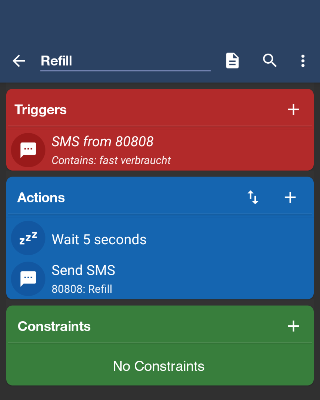
Done. It ran reliably for months without a single manual intervention. Downloads finished overnight, the kids streamed without interruption, and the data just kept going. Besides having to make sure your phone stays near its Wifi clients, this solution worked pretty good.
But recently I bought a GL.iNet Puli AX router.
Moving to the Router
The Puli AX (GL-XE3000) is a fine piece of hardware and software. It is an OpenWrt-based travel router with a built-in LTE modem, two SIM slots and a battery pack (and much more). It is highly configurable via their UI and fully customizable via its underlying Linux sytem.
GL.iNet’s SMS handling works through a shell script at /etc/forward. Every incoming SMS triggers this script with the sender and message content available as environment variables. Hooking into it is straightforward:
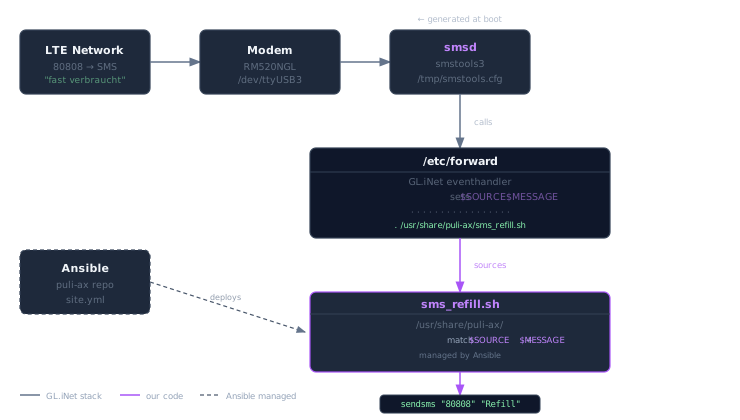
Here is our refill script:
| |
And in /etc/forward, a single line at the end:
| |
The live test confirmed it works exactly as expected. Continous downloads, 37 Mbps sustained, automatic refills firing every time a new GB ran out:
| |
Multiple refills in sequence is correct and intentional – the provider keeps sending the trigger SMS as long as data is being consumed, even at higher rates (LTE-wise).
From Script to State
At this point the automation works. But there is a problem: a shell script manually placed on a router is not infrastructure. It is a snowflake.
GL.iNet firmware upgrades wipe all system modifications – and /etc/forward is no exception.
Using sysupgrade.conf to include it in pre-upgrade backups would freeze the file permanently and lock out any fixes or improvements GL.iNet ships in future firmware updates. Not a trade-off worth making.
So the real solution is to treat the upgrade as a given and make recovery effortless: define the desired state in code, and restore it with a single command after every upgrade.
This led to a small Ansible repository: https://gitlab.com/gion-io/puli-ax.
The design principle is simple: declarative state management. Instead of running imperative commands, you declare what you want and let Ansible make it so. The entire configuration for a host lives in one file:
| |
That’s it. Run ansible-playbook site.yml and the script is deployed, the hook is in place, and everything is idempotent. Set it to false and re-run – the script is removed, the hook is cleaned up. No manual SSH, no remembering what files you touched.
After a firmware upgrade, /etc/forward is overwritten by GL.iNet. The fix: run the playbook again. One command, everything back to exactly the defined state.
The role contract enforces that every feature has both an install and an uninstall path. Adding a new capability – say, an SMS-triggered VPN toggle – means adding a role, a toggle in the host vars, and the rest follows the same pattern.
The Realization
While building this, it became clear that the SMS refill is just a useful hack hiding a much more powerful architecture: an Out-of-Band Control Plane.
By tapping into the cellular signaling layer, we aren’t just sending texts; we are creating a management channel that is entirely decoupled from the data network. If the WireGuard tunnel drops or the routing table collapses, the router still has a phone number. It remains reachable even when it is “offline” in the traditional sense.
What we’ve actually built here is a general-purpose remote execution framework. Any incoming SMS—validated by sender and content—can trigger any command on the device. The refill automation is just the proof of concept for a much broader toolkit:
- Remote Recovery: Trigger a VPN reconnect or a modem hard-reset when the link hangs.
- Status on Demand: Query the router’s health or WAN IP via a simple ping.
- Profile Switching: Toggle between network providers or firewall rules with one text.
Having a router with its own phone number is a more powerful primitive than it first appears. It’s the ultimate fallback for when things go south.
More on that in future posts.
Resources
- Puli-AX Ansible repository
- GL.iNet Puli AX (GL-XE3000)
- SMStools3 – SMS daemon, pre-installed on GL.iNet routers
- MacroDroid – Android automation app